
Today, let’s learn how to calculate a person’s age using Power Automate.
There are multiple ways to calculate a person’s age. The DOB field which I have is of string type. So, I thought of using Power Automate to achieve this.
Search for Common Data Service and the trigger should be When a record is created, updated, or deleted as shown in the below image. Next, enter the required details like the environment and the entity name.

Then we will add a condition to our flow, where we will check whether the Date of Birth field is null or not.
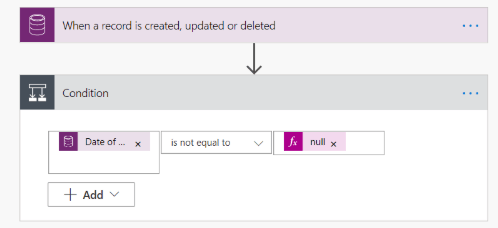
If the Data of Birth field is not null then we will calculate the age. For that when the condition is met the flow would go under IF yes condition, where we will have to provide the entity name and field under which the calculated age needs to be populated.

div(div(sub(ticks(utcNow('yyyy-MM-dd')),ticks(triggerBody()['new_dateofbirth'])),864000000000),365.25)
We will use the above expression for calculating the age.
Place the cursor inside the Calculate Age field and paste the above expression under the expression section and click on the Update button.

Now, we need to test our flow. Hit the Test button on the right top of your screen.

After a successful run of the flow. We can see age would have been populated under the Calculate Age field under the Contact entity.
Hope this helps anyone !!!
 Building Solutions - Avinash Verma